VueAMap 地图
二次封装的vue-amap的地图组件。支持搜索、定位、标记等功能。改变选中后,抛出地址、经纬度等信息。该组件包大小过大,且不好用,建议使用其他库。
组件源码
vue
<script lang="ts" setup>
import { ref, watch } from 'vue';

defineOptions({
  name: 'SMap'
})

const $props = defineProps<{
  location?: {
    lng: number;
    lat: number;
  };
}>();

const $emits = defineEmits<{
  changeAddress: [address: string]
  changeLocation: [location: { lng: number; lat: number }]
}>();

const center = ref([113.324516, 23.106519]);
const geocoder = ref(null);
const init = () => {
  // @ts-ignore
  AMap.plugin('AMap.Geocoder', () => {
    // @ts-ignore
    geocoder.value = new AMap.Geocoder({
      radius: 1000
    });
  });
};

const position = ref<[number, number] | []>([]);
const address = ref('');
const changeLocation = (location: {lng: number, lat: number}) => {
  position.value = [location.lng, location.lat];
  center.value = [location.lng, location.lat];

  $emits('changeLocation', {
    lng: location.lng,
    lat: location.lat
  });

  if (!geocoder.value) {
    return;
  }
  // @ts-ignore
  geocoder.value.getAddress(location, (status, result) => {
    if (status === 'complete' && result.regeocode) {
      address.value = result.regeocode.formattedAddress;
      $emits('changeAddress', address.value);
    }
  });
};
const onMarkerLocation = (e: any) => {
  changeLocation(e.lnglat);
};
const onSelectLocation = (e: any) => {
  if (e.poi.location) {
    changeLocation(e.poi.location);
    return;
  }
};

watch(
  () => $props.location,
  (val) => {
    if (!val) {
      return;
    }

    position.value = [val.lng, val.lat];
    center.value = [val.lng, val.lat];
  }
);
</script>

<template>
  <div class="amap">
    <el-amap :center="center" :zoom="18" @init="init" @click="onMarkerLocation">
      <el-amap-control-geolocation />
      <el-amap-marker :position="position" v-if="position.length" />
      <el-amap-search-box
        placeholder="请输入关键字"
        @select="onSelectLocation"
        @choose="onSelectLocation" />
    </el-amap>
  </div>
</template>

<style lang="scss" scoped>
.amap {
  width: 100%;
  height: 100%;
}
</style>
基本用法
- 先在main.ts中引入并注册
VueAMap组件,如下:
ts
import VueAMap, { initAMapApiLoader } from '@vuemap/vue-amap'
import '@vuemap/vue-amap/dist/style.css'

// 去高德地图开发者平台申请key
initAMapApiLoader({
  key: '',
  securityJsCode: ''
})

const app = createApp(App)
app.use(VueAMap)- 在vue组件中引入
SMap组件,如下:
vue
<template>
  <s-map @changeAddress="onChangeAddress" />
</template>

<script lang="ts">
import SMap from '...'

const onChangeAddress = (address: string) => {
  console.log(address)
}
</script>
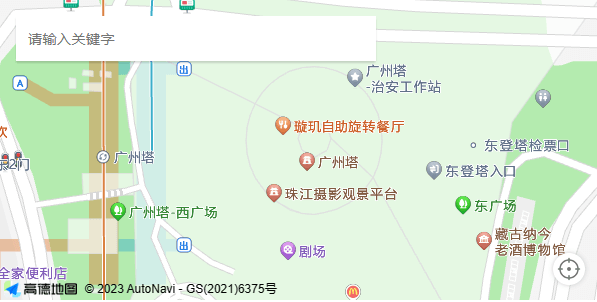
效果